

Funder matching
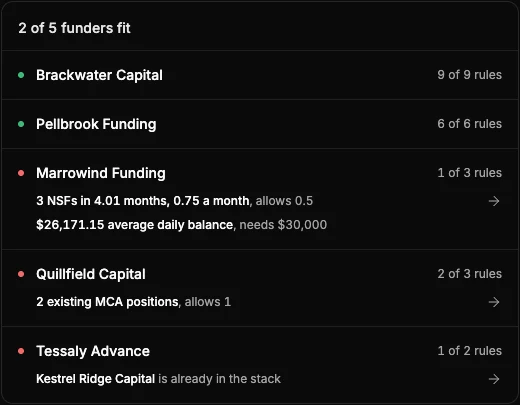
Every funder has its own minimums, position limits and restricted industries. Save each one's rules once, including hard stops on NSFs, negative days and industries, and every file shows which funders it fits and the rule each of the others fails. The decision stays yours.
7-day free trial with 10 credits. Cancel anytime.
How it works
What a funder's rules can check
- From the statements
- Minimum monthly true revenue, most existing MCA positions, most of revenue already paid to funders, most NSFs and negative days a month, minimum average daily balance and minimum months of statements, all taken from the analysis.
- Funders in the stack
- For each funder, pick the funders it won't fund behind. A file with a position from any of them fails, including an advance that has funded but hasn't started its pulls.
- From the application
- Minimum credit score and time in business, a funding range for the requested amount, and the states, industries and entity types the funder won't fund. Enter the merchant's details once per file. The state comes from the statements unless you change it.
- Fits or doesn't
- A funder fits when none of its rules fail. Under each funder that doesn't, every failing rule is listed with the figure it was checked against, such as "2 existing MCA positions, allows 1".
- Not checked
- A rule with nothing to check against, such as a credit score not yet entered, is listed under the funder as not checked, so you know what's left to confirm.
- The transactions behind it
- A failing figure from the statements opens the transactions behind it, such as the NSFs or the MCA debits.
- One list for the team
- Owners and admins save funders under Settings. Every analysis in your organization is checked against the current rules, and every member sees the results.
FAQ
Common questions
Can I set hard stops for NSF count, negative days or restricted industries?
Yes. Save them as a funder's rules, such as the most NSFs or negative days a month, excluded industries and states, and minimum true revenue. A file that breaks one shows the rule and the figure behind it. Underly flags the file and never declines it for you.
Does it tell me which funder will approve the file?
No. It checks the file against the rules you saved for each funder. The funder still makes the call.
Where do the funder rules come from?
From you. Add each funder with the rules from its guidelines, and edit them when the funder changes them. Every analysis uses the current rules.
Does Underly send the file to the funders?
No. Submit it the way you do today, with the PDF summary or the Excel workbook attached.
Do positions I exclude still count?
No. An excluded position leaves the MCA position count, the share of revenue already paid to funders and the funders in the stack.
Is it on every plan?
Yes, and in the free trial too.
Other features
- MCA stacking detectionEvery existing advance and loan by funder, with its payment, cadence and monthly total.
- True revenueTransfers, owner deposits, loan proceeds and returns taken out of gross deposits.
- Negative days and NSFsAverage daily balance, lowest balance, negative days and NSF returns, with a day-by-day balance calendar.
- Altered bank statement detectionEvery statement rated High, Medium or Low risk on upload, with the finding and the figures behind it.
- Line-item labelsEvery transaction labelled, from processor deposits to MCA debits and NSFs. Relabel in bulk and every figure recalculates.
- Debt-to-revenueExisting debt payments as a share of true revenue, so you see the room left before you fund.
- Business record checkThe merchant's state record, UCC filings and court cases, checked from the same analysis as the statements.
Try Underly free for 7 days
10 credits in the trial. Cancel anytime. Unlimited users on every plan.