

Business record check
Bank statements can't show a dissolved entity, a lien filed last month or a funder's lawsuit. Check the business from the same analysis, with a link to each record.

How it works
What the check shows
- State standing
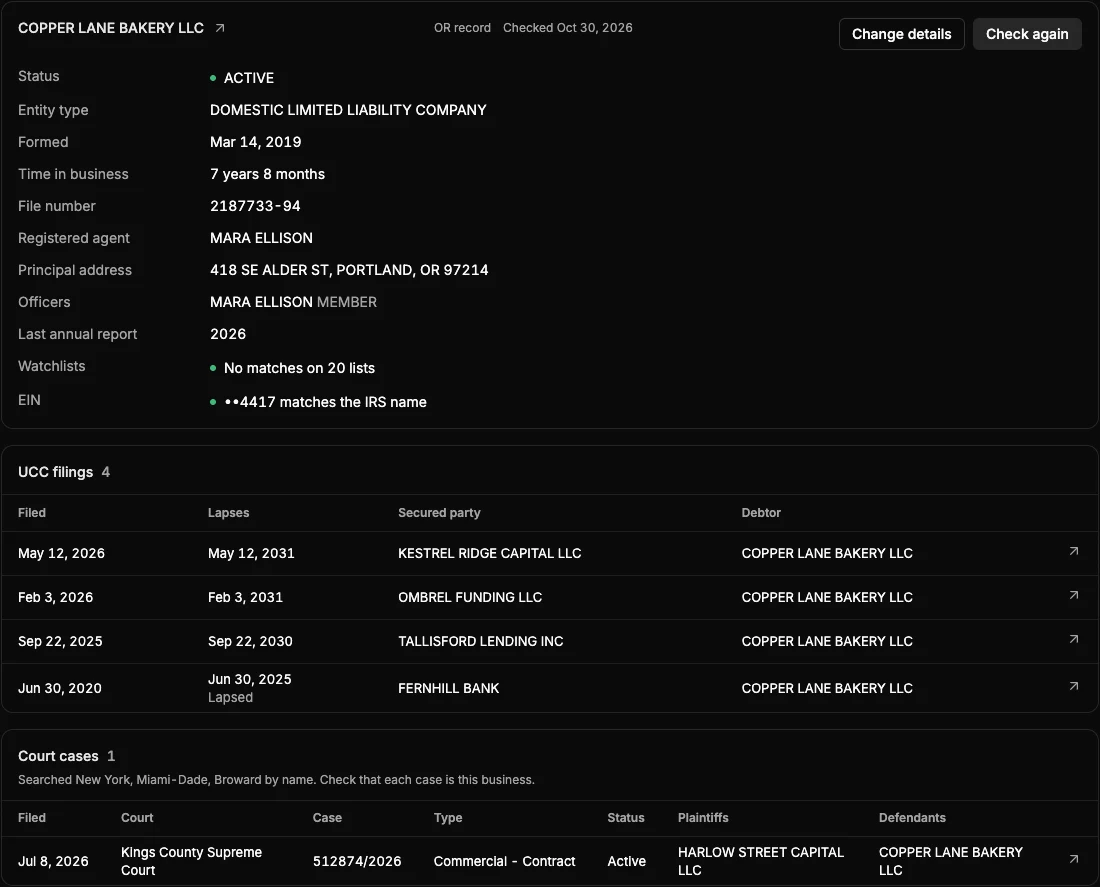
- Status, entity type, formation date, time in business, file number, registered agent, principal address and officers, as the state records them.
- UCC filings
- Every filing found against the business, with secured party, debtor, filing date and lapse date. Filings past their lapse date are marked lapsed.
- State of formation
- A business formed in another state has its liens filed there. That state is searched too where it can be, and the check says so where it can't.
- Court cases
- Cases naming the business in New York, Miami-Dade and Broward courts, with plaintiffs, case type and status.
- Watchlists
- The business and its officers screened against sanctions, politically exposed person, debarment and wanted lists. On paid plans.
- EIN
- Enter the EIN from the application and see whether it matches the IRS name for the business. On paid plans.
- In the report
- The record goes into the PDF report and the Excel workbook beside the statement figures.
FAQ
Common questions
What does a check cost?
Nothing extra. The state record, UCC filings and court cases are included in every plan, the free plan too. Watchlists and the EIN match come with paid plans. There's no per-check fee.
How long does it take?
Usually 1 to 4 minutes. You can leave the page while it runs.
What if several businesses share the name?
You pick the right registration from the matches, each with its status, formation date and address. A street or ZIP narrows the matches first.
What if a state or court can't be searched?
The check says which ones weren't searched, so an empty list never stands in for a search that didn't happen.
Is every court case this business?
Cases are found by name, so check that each one is this business. Each case links to the court's record.
Other features
- MCA stacking detectionEvery existing advance and loan by funder, with its payment, cadence and monthly total.
- True revenueTransfers, owner deposits, loan proceeds and returns taken out of gross deposits.
- Negative days and NSFsAverage daily balance, lowest balance, negative days and NSF returns, with a day-by-day balance calendar.
- Altered statement detectionPDF metadata and balance math checked on upload, so edited files are flagged before you fund.
- Line-item labelsEvery transaction labelled, from processor deposits to MCA debits and NSFs. Relabel in bulk and every figure recalculates.
- Debt-to-revenueExisting debt payments as a share of true revenue, so you see the room left before you fund.
Start with 10 free statements
No card required. Unlimited users on every plan.